# Edição

Para editar algum relatório semanal que foi preenchido de forma errada, primeiro você precisa acessar a tela dos relatórios:&#x20;

**👉&#x20;**<mark style="color:blue;">**1º:**</mark> Clique no botão indicado na imagem.

<figure><img src="/files/4l9XNl1hFNtqJyGydSG3" alt=""><figcaption></figcaption></figure>

**👉&#x20;**<mark style="color:blue;">**2º:**</mark> Clique na opção "***Semanal***".

<figure><img src="/files/8DCdnQl7HlWIEBDAennt" alt=""><figcaption></figcaption></figure>

**👉&#x20;**<mark style="color:blue;">**3º:**</mark> Clique no botão (verde) que já estará preenchido, como na imagem abaixo.

<figure><img src="/files/IJAuQSQmQrGqD9hDg5xw" alt=""><figcaption></figcaption></figure>

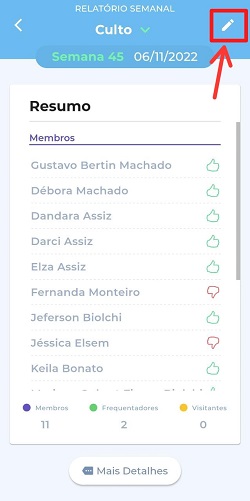
👉 <mark style="color:blue;">**4º:**</mark> Em seguida abrirá uma nova aba, clique em **editar** (no *"lápis"* localizado no canto superior da tela) e faça as alterações desejadas.&#x20;

<figure><img src="/files/DEcWstjQfWCneAk3VmbK" alt=""><figcaption></figcaption></figure>

Feito isso, clique em ***Finalizar*** para salvar o relatório. ✅


---

# Agent Instructions: Querying This Documentation

If you need additional information that is not directly available in this page, you can query the documentation dynamically by asking a question.

Perform an HTTP GET request on the current page URL with the `ask` query parameter:

```
GET https://ajuda.grex.com.br/guia-completo/relatorio-semanal/edicao.md?ask=<question>
```

The question should be specific, self-contained, and written in natural language.
The response will contain a direct answer to the question and relevant excerpts and sources from the documentation.

Use this mechanism when the answer is not explicitly present in the current page, you need clarification or additional context, or you want to retrieve related documentation sections.